SRT vs VTT: Which Subtitle Format Should You Choose?
Both formats keep captions matched to the video. The right choice depends on where the file goes next: a video editor, a web player, or a document you simply want to read.
Written by the YT to Text team
Published August 12, 2026
Updated August 12, 2026
8 min read
This guide compares the same caption in both formats, then turns the differences into a practical choice for editing, publishing, and reading.
Quick answer
Choose SRT for most video editors and subtitle uploads. Choose VTT for captions in an HTML5 or browser-based video player. Choose TXT when you need readable words rather than a timed subtitle file. When a platform names a required format, follow that requirement.
SRT and VTT solve the same basic problem
A subtitle file is a schedule for text. Each cue tells a player when a line should appear, when it should disappear, and what the viewer should read. SRT and VTT both carry that schedule, so either can preserve the timing from the same caption track.
The difference appears when another app reads the file. SRT is the familiar, broadly accepted choice in editing and upload workflows. VTT was designed for the web and can carry browser-oriented cue settings and styling information. Start with the destination, not the file extension.
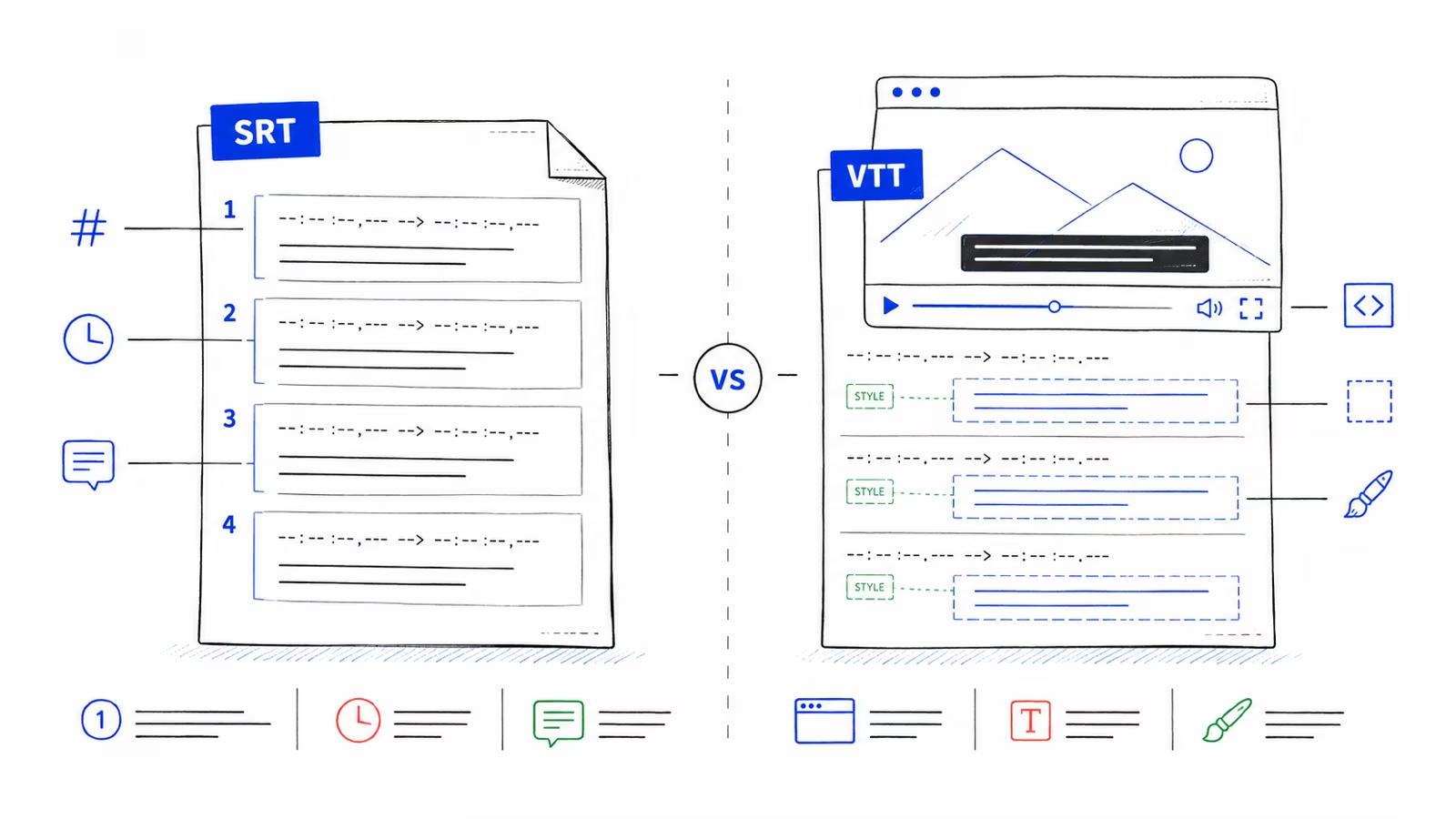
The same caption looks slightly different in each file
A single caption can contain the same words and time range in both formats. The visible differences are small, but they matter to the app that parses the file.
SRT normally numbers each cue and separates milliseconds with a comma. VTT begins with a WEBVTT header, uses a period for milliseconds, and does not need sequential cue numbers.
One caption in SRT and VTT
SRT 1 00:00:02,500 --> 00:00:05,000 Choose the format that matches your next step. VTT WEBVTT 00:00:02.500 --> 00:00:05.000 Choose the format that matches your next step.
SRT vs VTT differences that affect your choice
Most people do not need every detail of either format. They need to know which file is most likely to open cleanly in the tool they already use.
Use the table as a decision check. If the destination gives exact upload instructions, those instructions take priority over a general recommendation.
| Feature | SRT | VTT |
|---|---|---|
| Best default use | Video editors and common subtitle uploads | Web video players and browser captions |
| File opening | Starts with the first cue number | Starts with WEBVTT |
| Milliseconds | Comma, such as 00:00:02,500 | Period, such as 00:00:02.500 |
| Cue identifiers | Sequential numbers are normally used | Identifiers are optional |
| Position and styling | Limited and handled differently across apps | Supports cue settings and web styling |
| Browser use | Usually needs conversion or player support | Designed for the HTML video track element |
| Ease of manual reading | Simple and familiar | Still readable, with extra web-oriented options |
| Compatibility check | Confirm the editor or upload form accepts SRT | Confirm the player or platform accepts WebVTT |
Choose SRT when the file is going into a video editor
SRT is the safer first download when your next step is editing a video, sending subtitles to a collaborator, or uploading captions to a system that lists SRT as an accepted format. Its simple cue structure is widely recognized and easy to inspect in a text editor.
Do not assume every editor supports every detail in exactly the same way. Import a short file first when the project depends on line breaks, character names, or precise placement.
- You are importing captions into a desktop video editor.
- A client or platform specifically requests an .srt file.
- You want a simple timed file that is easy to review by hand.
- You do not need browser-specific cue positioning or CSS styling.
Choose VTT when the captions will play on a website
VTT is the natural choice when you control a web page or video player that uses browser caption tracks. It was built for timed text on the web and can include cue placement, alignment, voice spans, and styling that a plain SRT workflow does not reliably carry.
The extra capability is useful only when the destination supports it. If a hosting platform asks for SRT, upload SRT even when the video will eventually appear on a website.
- You are adding captions to an HTML5 video player.
- Your hosting platform specifically requests WebVTT or .vtt.
- You need supported cue positioning or web caption styling.
- Your workflow already uses WebVTT files from other videos.
Choose TXT instead when timing is not the job
SRT and VTT are built for playback. Their cue numbers, time ranges, and line breaks become clutter when your real goal is reading, note-taking, quoting, summarizing, or searching the spoken words.
Choose clean TXT for readable paragraphs. Choose timestamped TXT when you want plain text with convenient reference points. Keep an SRT or VTT copy only if you may return to subtitle editing later.

How to download SRT, VTT, or TXT
You do not need to decide before the caption result is ready. Open the transcript workspace once, check the selected language, and download more than one format when the file will move through several tools.
For example, you can keep TXT for review, send SRT to an editor, and use VTT on a web player. Each download is created from the same selected caption track.
- Enter the YouTube video link and open the transcript workspace.
- Choose the caption language you want to use.
- Select Download in the workspace toolbar.
- Choose SRT, VTT, clean TXT, or timestamped TXT.
- Open the downloaded file in its destination app and check the first, middle, and final captions.
See the full YouTube Subtitle Downloader for language selection, file previews, and download details.
Download the format you need
Enter a YouTube link, choose the subtitle language, and save the result as SRT, VTT, or TXT.
Avoid the format mistakes that break captions
Renaming captions.vtt to captions.srt changes only the label on the file. It does not replace the WEBVTT header, change periods to commas in timestamps, add cue numbers, or remove VTT-only settings. An editor can still reject the renamed file because the contents remain VTT.
The reverse is also true. A file called captions.vtt is not valid WebVTT merely because its extension changed. Download the correct format again or use a converter that parses and rewrites the cues.
After any conversion, check timing around long pauses, overlapping speakers, music labels, and the final cue. Automatic captions can also contain wrong names or numbers, regardless of the file format.
- Keep the original file until the new one has been tested.
- Use UTF-8 when an editor asks for a text encoding.
- Do not remove time ranges from SRT or VTT; use TXT for untimed text.
- Check the destination's current upload rules before a large batch.
Check the WebVTT rules when a player is strict
Browser players and publishing systems can reject a file for a missing header, malformed timestamp, or unsupported cue setting. The WebVTT standard and MDN guide are useful when you need to inspect a file beyond the basic choice in this guide.
- W3C WebVTT specificationThe format rules for WebVTT files, cues, timestamps, settings, and rendering.
- MDN WebVTT guideA practical browser-focused overview of WebVTT captions and the HTML video track element.
SRT and VTT questions
The destination usually decides the format. The caption words and timing can remain the same.
Is SRT or VTT better?
Neither is better for every task. SRT is the better default for many video editors and subtitle uploads. VTT is the better fit for browser-based video players.
Can I convert VTT to SRT by renaming the file?
No. Renaming changes the extension but not the header, timestamp punctuation, cue structure, or VTT settings inside the file.
Do SRT and VTT keep the same caption timing?
They can represent the same start and end times. Their timestamp punctuation and surrounding file structure are different.
Does VTT support styling?
Yes. WebVTT can carry cue settings and work with web caption styling. Support still depends on the player and platform.
Which format should I use for YouTube subtitles?
Use the format required by the place you will upload or edit the file. SRT is a common editing choice; VTT is common for web players; TXT is best for reading.
Should I use SRT or TXT for a transcript?
Use SRT when captions must appear at specific playback times. Use TXT when you need readable words for notes, quotations, search, or analysis.