Is there a free DownSub alternative?
Yes. YT to Text is free for up to 3 successful transcripts per device each day, and failed attempts do not count against that limit. No install, no browser extension and no account are needed to get a transcript.
DownSub alternative
DownSub hands you a subtitle file. This page gives you the whole video as something you can actually read, search and move through — then export as TXT, SRT or VTT when you need a file.
The short answer
DownSub is a free online subtitle downloader. You paste a video URL, choose a subtitle language and format, and it returns a subtitle file — SRT, VTT or TXT. No account and no extension are required. Its public service description also covers sites beyond YouTube, while this page stays focused on YouTube transcripts.
That is a genuinely useful job, and it is the job DownSub was built for. The friction starts the moment you want to do anything with those subtitles other than store them. SRT and VTT contain timecodes, but a downloaded file does not let you search a phrase across the whole talk or jump straight to the moment a claim was made.
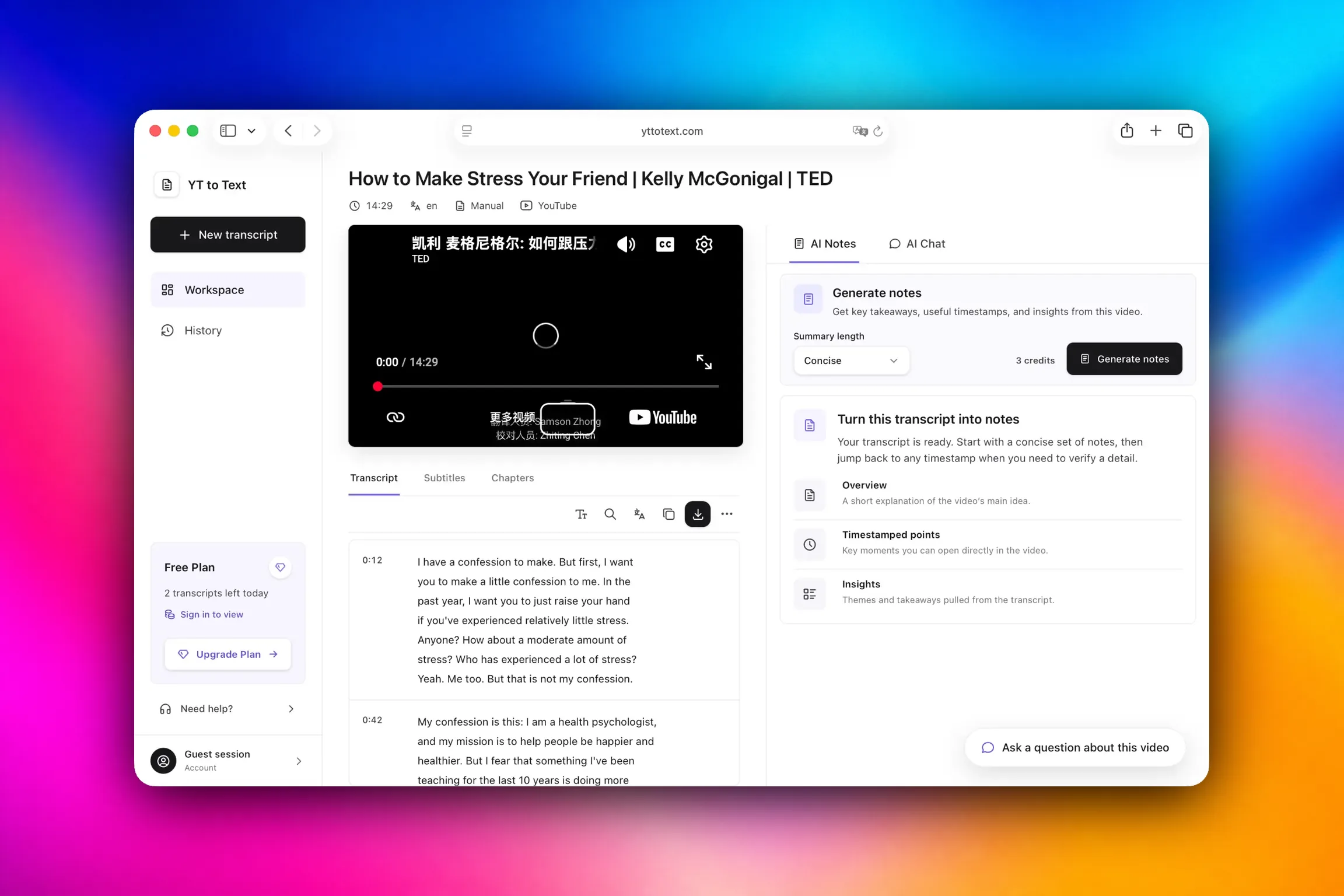
A transcript workspace is a different shape of tool. The text stays on screen next to the video, every line carries a timestamp you can click, and searching a phrase highlights the matches in place instead of handing you a plain-text file to scan by eye.
The choice usually comes down to workflow. A download-first tool is useful when you already know the language and file format you need. A transcript workspace is better when you want to read first, search a phrase, verify a line against the video and export only after that.
Why switch
These are the friction points that show up once subtitles stop being a one-off download and start being part of how you work.
A subtitle file is built to be attached to a player, not read. To study a lecture, quote a talk or review a sales call you need the text laid out at reading width with the video one click away — not a file you have to open somewhere else.
SRT and VTT files are full of timestamps, but a plain text editor cannot use them. In a transcript workspace every timestamp is a control: click 12:04 and the video seeks to 12:04, so a line can be checked against the moment it was said.
Downloading subtitles to look up a single phrase means fetching the whole file and scrolling through it. Searching the transcript on the same page, with next and previous match, turns a two-minute hunt into a two-second one.
One 90-minute recording produces a wall of text with no structure. Paragraph density controls, auto-scroll that follows playback and chapter markers — where the video provides them — make long-form and playlist work manageable instead of exhausting.
Once the transcript is on screen you can save notes against specific lines, map the ideas, build flashcards or ask questions about the video. The AI tools run on credits — a free account starts with 10 one-time AI credits, and each one shows its cost for the video length before it runs. A downloaded file is a dead end; a transcript is where the work begins.
A file-first workflow makes the format decision come first. Here the transcript opens in the browser, so you can read and search it before exporting TXT, SRT or VTT.
When the job is a YouTube video, this page keeps the path narrow: paste the link, load the available caption track, read it beside the player, then export the format you need. It does not ask you to install an extension or upload the video.
A subtitle file does not tell you whether a human typed it or a machine guessed at it, and that difference decides whether a quote is safe to use. Every transcript here shows its caption language and labels the source as manual or automatically generated.
Side by side
Both tools can return subtitle text from a YouTube link. The difference is what happens before and after the text appears. The DownSub column follows its public service description, checked on 12 September 2026; the comparison is deliberately fair — a downloader is still the better fit when you only need a file or another supported site.
| Point of comparison | DownSub | YT to Text |
|---|---|---|
| Sites covered | YouTube plus Viki, Viu, WeTV, iQiyi, Hotstar, Dailymotion and 50+ others | YouTube only, by design |
| Where the text ends up | A subtitle file you download | A readable workspace beside the player |
| Formats | SRT, VTT, TXT | TXT, SRT and VTT for the transcript; TXT and MD for notes |
| Steps to the text | Download-first flow: choose the language and file format before saving | Paste the URL — the transcript opens |
| Search inside the text | Not part of the download flow | Full-transcript search with next and previous match |
| Timestamps | Written into the file | Clickable, and they seek the video |
| Caption source shown | The downloaded file is the deliverable | Shown in the transcript, and labelled manual or automatically generated per language |
| Beyond the text | Subtitle translation into other languages, and downloading the video itself | Chapters, notes on individual lines, mind map, flashcards, AI chat |
| Playlists | One video at a time | Batch mode resolves the whole playlist |
| Cost and limits | Free and unlimited, ad-supported | Free for 3 successful transcripts per device each day, with failed attempts not counted; AI features use credits |
What you get
Everything below runs on the caption track YouTube already has. No video upload and no extra software.
The full caption track laid out as text at a comfortable reading width, with timestamps you can switch off when you only want the words.
Switch between the transcript and subtitle views, and navigate by chapter markers where the video provides them.
Type a word or phrase and move through the hits one by one, with the matched lines highlighted in place.
Download TXT for reading, SRT or VTT for re-uploading, and TXT or Markdown for AI notes.
Generate concise or detailed notes with timestamps, build a mind map, make flashcards, or ask questions about the video. These run on AI credits: a free account starts with 10 one-time credits, and each tool shows its cost for the video length before you use any.
Save a transcript line or a mind-map node as evidence and return to the exact moment that matters.
How to
Three steps, and the first one is the only one that takes any effort.
Copy the video address and paste it into the box at the top of this page. A full URL or just the video ID both work.
The transcript loads with its caption language and source shown. Use the timestamp toggle to hide or keep timestamps, and the density control to change paragraph length.
Search for a phrase, click any timestamp to move the video to that moment, then download TXT, SRT or VTT — or turn the transcript into notes.
Straight answer
We are not the right tool for everything, and pretending otherwise would waste your time. DownSub pulls subtitles from Viki, Viu, WeTV, iQiyi, Hotstar, Dailymotion and dozens of other platforms. This tool is built for YouTube and only for YouTube.
If you need subtitles from a non-YouTube source, or you genuinely just want a subtitle file to attach to a player and nothing else, use DownSub. If you have a YouTube video and you need to read it, search it, quote it or study it, that is the part we are built for.
FAQ
Short, direct answers about moving from a subtitle downloader to a transcript workspace.
Yes. YT to Text is free for up to 3 successful transcripts per device each day, and failed attempts do not count against that limit. No install, no browser extension and no account are needed to get a transcript.
It does. Everything runs in the browser: paste the link, read the transcript, and download a file when you want one. There is nothing to install and no extension to grant permissions to.
Yes. The transcript downloads as TXT, SRT or VTT. SRT and VTT keep cue numbering and timecodes so the files stay usable in editors and players, and TXT gives you clean text for reading or pasting elsewhere.
Subtitles are caption cues written for a player: short lines, each with a start and end time. A transcript is that same caption track presented as readable running text. YT to Text offers both views, and the transcript you export keeps timestamps that stay clickable in the workspace.
Yes. Search runs over the whole transcript and moves through matches with next and previous controls, so a word, name or phrase can be found without scanning a file by hand. That is the main thing a downloaded subtitle file cannot do.
Yes. Each transcript shows the caption language and whether the source is manual or automatically generated, so you know how much to trust the wording before you quote it.
Yes. Playlists are handled in batch mode rather than one video at a time. Paste the playlist link and the individual videos are resolved for you.
No, nothing is uploaded. The transcript is read from the caption track YouTube already publishes for public videos, which is why the process is fast and why videos without captions cannot be processed.
No. YT to Text is an independent tool and is not affiliated with or endorsed by DownSub or YouTube. YouTube is a trademark of Google LLC.
No. YT to Text runs in the browser: paste a public YouTube link, read the available transcript and export it when needed. Do not enter a YouTube password or install an extension just to retrieve captions.
Paste the YouTube link into this page and use the transcript workspace when the video is public and has an available caption track. You can search and verify the text before exporting TXT, SRT or VTT. If no caption track exists, this workflow cannot create one from audio.
The transcript itself is free, up to 3 successful transcripts per device each day, and failed attempts do not count. The AI tools use credits instead: a free account includes 10 one-time AI credits, and each tool shows its exact cost for the video length before you run it. As a guide, on a 30-minute video concise notes cost 3 credits, detailed notes 5, a chat question 2, a mind map 5, and flashcards 3 to 6.
Try this page with a video you already know. You will have the transcript on screen before you would have finished picking a subtitle format.