YT to Text

YouTube Shorts transcript

YouTube Shorts transcript: paste the link, read the text

A Shorts link works here exactly like any other YouTube link. Paste one and the caption track comes back as text you can read, quote and search — then export as TXT, SRT or VTT when you need a file.

3 free successful transcripts · Failed requests don’t count · No video upload

  • Paste a /shorts/ link — nothing to install
  • Captions come back with timestamps
  • Search it, or export TXT, SRT, VTT
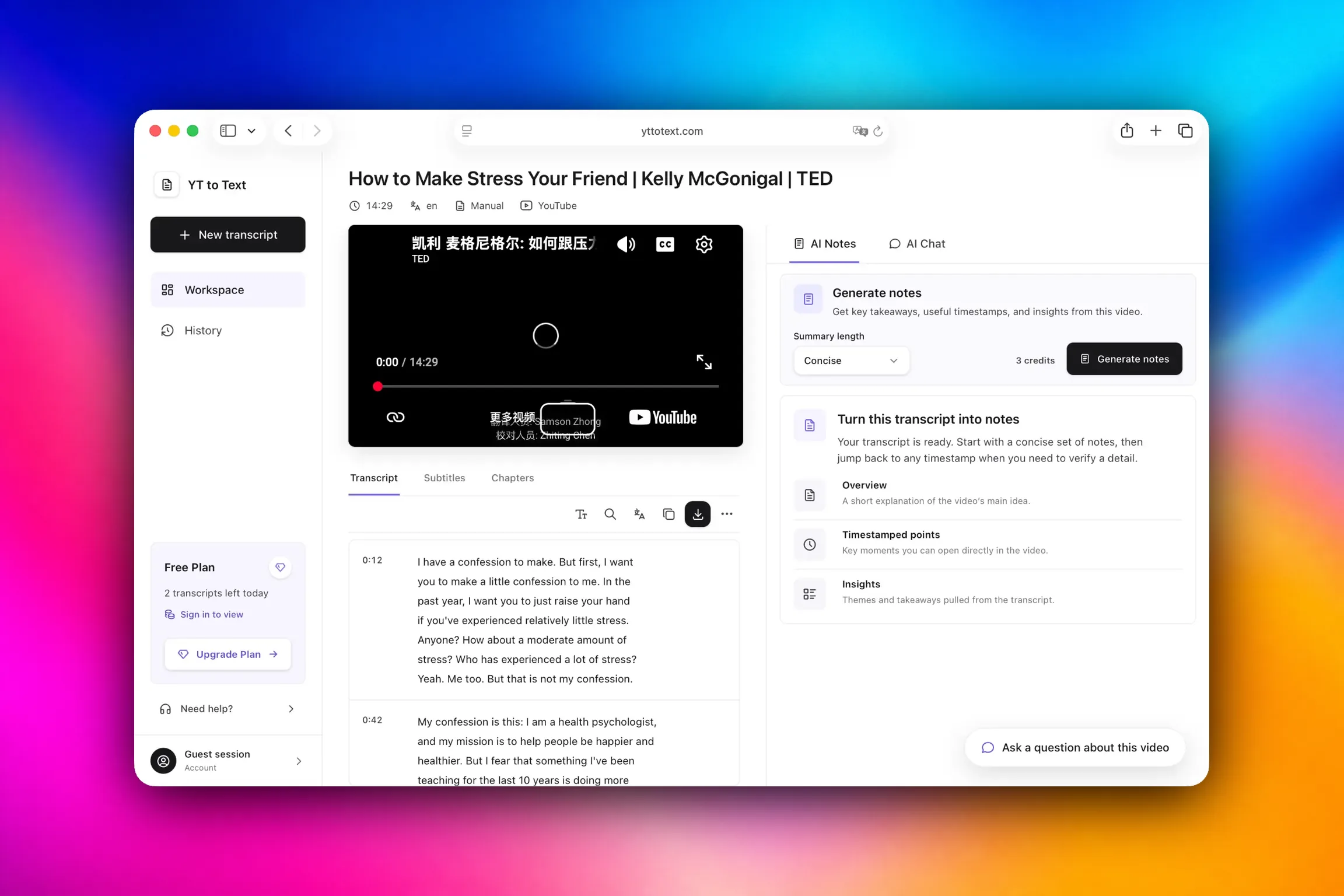
A YouTube Shorts transcript open in the YT to Text workspace with clickable timestamps
A Shorts transcript in the YT to Text workspace. Every line carries a timestamp that seeks the video.

The short answer

Where a Shorts transcript actually comes from

A YouTube Short is an ordinary YouTube video with a vertical crop and a short runtime. It has a video ID like any other upload, which is why a link of the form youtube.com/shorts/VIDEOID can be read directly — you do not have to rewrite it into a watch URL first, and there is nothing to install.

What comes back is the caption track YouTube already publishes for that video: the same lines a viewer would see on screen, in order, each tagged with the moment it appears. On a 40-second clip that is a handful of lines, but they are text you can copy, search and keep, instead of a video you have to scrub through again.

One thing decides whether this works, and it is not the link format. It is whether the Short has captions at all. This tool reads existing caption tracks — it does not listen to the audio — so a Short with no captions has no transcript to hand back, no matter which URL you paste.

Why this is awkward

Why pulling text out of a Short is harder than it looks

Short videos, short captions — you would think this is the easy case. In practice it is the format where the text is hardest to reach by hand.

  1. 01

    The transcript panel is built for long videos

    On a normal video you can open the transcript panel and read along. On a phone — where most Shorts are watched — that route is fiddly, and selecting text over a looping vertical clip is worse.

  2. 02

    Hand-copying does not scale

    Retyping two lines from one Short is fine. Doing it for twenty Shorts, or for every hook a competitor posted this month, is an afternoon gone. Pasting a link and reading the text is the same job in seconds.

  3. 03

    Shorts are where the quotable lines live

    Hooks, product names, one-line claims and opening lines increasingly exist only in Shorts. If you are filing a quote or studying how a clip is framed, retyping it by ear is the slowest possible way to get it right.

  4. 04

    You cannot search inside a video

    There is no way to look for one phrase inside a clip. Once the transcript is text, search covers the whole thing with next and previous match, so finding a single line stops meaning replaying the Short three times.

  5. 05

    Timestamps still matter in a short clip

    Even in a short clip, knowing which second a line lands on lets you check the wording against the original. Every timestamp in the transcript seeks the video, so a doubtful line takes one click to verify.

  6. 06

    Text is the form you can reuse

    A transcript drops into notes, a spreadsheet of hooks, a subtitle file or a translation pass. A video does not. The text is the part that travels, and it is the part a Short makes hardest to get.

What you get

Everything that comes back with the text

All of it runs on the caption track YouTube already publishes for public videos. Nothing is uploaded and nothing is installed.

  • A transcript you can read

    The full caption track laid out as running text, with a timestamp toggle for when you only want the words.

  • Timestamps that seek

    Click a line's timestamp and the video jumps to that second, so the wording can be checked against the clip.

  • Search with next and previous match

    Type a word or phrase and step through the hits, with matched lines highlighted in place.

  • Exports that keep their meaning

    Download TXT for reading or pasting, SRT or VTT to re-use as subtitles, and TXT or Markdown for notes.

  • Caption language and source shown

    Each transcript names the caption language and whether the source is manual or automatically generated, so you know how much to trust the wording before you quote it.

  • Notes and study tools

    Save a line as evidence, map the ideas, build flashcards or ask questions about the clip. The AI tools use credits, and each one shows its cost for the video length before it runs.

How to

How to get a transcript from a YouTube Short

Three steps, and the first one is a copy-paste.

  1. 01

    Copy the Shorts link

    Tap Share on the Short, or copy the address from your browser. A youtube.com/shorts/... link, a youtu.be link and a bare 11-character video ID all work without rewriting.

  2. 02

    Paste it and open the transcript

    The transcript loads with its caption language and source shown, so you can see what you got. No caption track means no text — see the section below for why.

  3. 03

    Search, jump, export

    Search for a phrase, click any timestamp to move the video to that moment, then download TXT, SRT or VTT — or turn the transcript into notes.

Straight answer

When a Short has no transcript to get

This tool reads the caption track YouTube already publishes for a public video. It does not run speech recognition, so a Short with no captions cannot be transcribed here. Turning audio into text is a different job that needs a speech-to-text service.

Whether a particular Short has captions is decided outside our control: by the uploader, or by YouTube's own automatic captioning. When a transcript does load, it names the source and marks it manual or automatically generated, so you know exactly which one you are reading.

Private and age-restricted videos may be unavailable to this workflow even when YouTube shows captions to an authorized viewer. The supported path is a publicly accessible video with a caption track, and that boundary is deliberate rather than a missing feature.

FAQ

YouTube Shorts transcript: common questions

Short, direct answers about getting text out of Shorts.

Can I get a transcript from a YouTube Short?

Yes, whenever the Short has captions. Paste the /shorts/ link and the caption track comes back as text with timestamps. If the Short has no caption track there is nothing to extract, because this tool reads existing captions rather than transcribing audio.

Do I have to convert the Shorts link into a normal YouTube URL?

No. A youtube.com/shorts/... link is read directly, as are youtu.be links and bare video IDs. Nothing needs rewriting before you paste it.

Why can I not get a transcript for a particular Short?

Almost always because the video carries no caption track. Automatic captioning does not cover every upload, and Shorts are more often music, montage or visuals with no speech at all. There is no audio transcription here to fall back on.

Is it free?

Yes. Up to 3 successful transcripts per device each day, and failed attempts do not count against that limit. Reading a transcript needs no account, no extension and no install.

Does it work on a phone?

It does. Everything runs in the browser, so there is no app to install and no extension to grant permissions to. Paste the link and read the transcript on the same device you watched the Short on.

Can I download the captions as a file?

Yes. The transcript exports as TXT, SRT or VTT. SRT and VTT keep cue numbering and timecodes so the files stay usable in editors and players, and TXT gives you clean text for reading or pasting elsewhere.

Can I remove the timestamps from the text?

Yes. There is a timestamp toggle in the transcript toolbar; switch it off and the text — on screen and in the export — is plain running text with no timecodes.

Can I search inside a Shorts transcript?

Yes. Search runs over the whole transcript with next and previous controls, so a single line in a 45-second clip is quick to find instead of requiring a rewatch.

Is YT to Text affiliated with YouTube?

No. YT to Text is an independent tool and is not affiliated with or endorsed by YouTube. YouTube is a trademark of Google LLC.

Paste the Short's link and read it instead of replaying it

Try it with a Short you have already watched. If it has captions, the text is on screen before the clip would have finished another loop.

Works with videos that have available captions.